
Zero-based budgeting overview
Zero-based budgeting overview
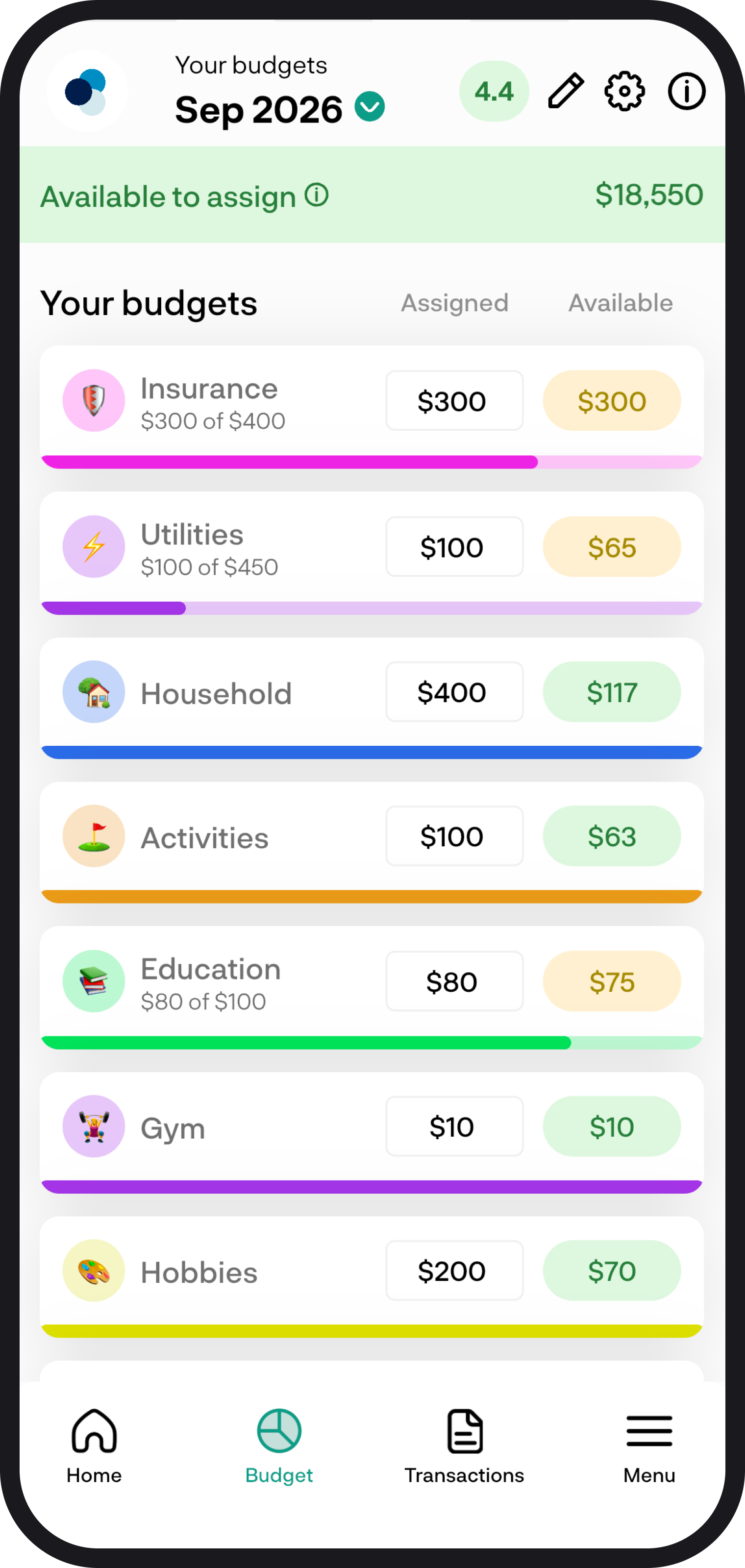
Zero-based budgeting means every dollar gets a job. Money from the accounts you selected sits in Available to assign, then you give it to your expense categories and credit cards. Targets are what you plan to put aside this period. Assigned is what you have actually given so far.
1. A quick summary
In Budget settings, switch Preferred method to Zero-based. Pick weekly, fortnightly, monthly, or custom, then choose a start date and which accounts feed this budget.
Inflows from those accounts add to Available to assign. You set targets, then assign money to each category. Leftover stays in the category that still has money.
For the step-by-step, read How to switch to zero-based budgeting.
2. Available to assign
This is leftover unassigned money plus new income, minus what you have already assigned this period. If you assign more than you have, it shows as over-assigned.
Tap Available to assign to see the breakdown: un-assigned from last period, inflow this period, overspending from last period, un-budgeted spend, assigned this period, and assigned in future periods.
Last period's cash overspend is taken here. Leftover still sitting in other categories stays in those categories. Uncategorised or unbudgeted spend also reduces Available to assign.
This is not Available to spend on the budget breakdown. Available to spend is leftover already in categories plus this period's assigned, minus spend.
3. Expense budgets
Each category shows Assigned, Actual, and Available. Available is leftover from last period plus what you assigned, minus what you spent.
Use Edit targets, Quick add, or Add new to set categories up. Type an assigned amount on the category row. That money leaves Available to assign and becomes Available in that category. The progress bar fills as you assign toward your target.
Tap a category name to see leftover, assigned, spent, and Available, or to move money to another category.
4. Credit cards
Cards you include in your budget get their own section. Assigned is extra money you have put toward the card from Available to assign.
Ready to pay is leftover plus assigned plus funded spend, minus payments made after the card was added. If a card is underfunded, you can Cover it from Available to assign.
Credit cards are not included in leftover from last period or Available to spend on the breakdown.
Read How credit cards work in zero-based.
5. Settings, periods, and buffer
In Budget settings you can switch method, pick weekly, fortnightly, monthly, or custom, and choose which accounts feed this budget. Leftover, overspend, and inflows do not come from any period before your start date.
The buffer pill shows how many of those periods your leftover money could cover if you stopped getting paid today. Tap it for the breakdown. It adds Available to assign to leftover sitting in expense categories, then divides that by your average targets going forward. A category can also show its own buffer.
You're all ready to go
Give every dollar a job, keep an eye on Available to assign, and check back each period. If you run into any issues, feel free to get in touch with us at hello@budgetbuddie.co.nz